Fork bomb is a denial of service attack on the operating system wherein a process continually replicates itself to deplete available resources, causing resource starvation and slow down or system crash. The current Linux kernel sets a limit to the maximum process id in the limits.conf system file
to prevent from such attacks. This would lead to denial of fork calls even to legitimate processes. This kernel functionality moves a step forward to identify a fork bomb by calculating the time between two fork calls along with enforcing a threshold.
Solution
The solution approach involves developing a loadable kernel module(LKM) that hooks the fork system call in order to examine if the system call is from a fork bomb. This can be found out if the fork call is from a process with process id larger than a predefined system threshold or if the time elapsed after process creation of the child processes is less than a predetermined period. If the call is made by a potential fork bomb, the process is not allowed to execute the fork system call and notifying the user about the event.
The module once loaded is expected to intercept all fork calls and detect if there is a fork bomb spawning processes. If it detects unusual forking by any process, the process will not be allowed to complete the fork call. The action taken will be logged in syslog.
The project is hosted in GitHub.
Fork
17 Mar 2016

16 Mar 2016
Why do you want to type sudo apt-get install always when you can make it short to sagi or magi?
As normal unix users, we frequently use the mundane sudo apt-get install, sudo apt-get upgrade, sudo apt-get remove etc. commands. As busy developers, we often need to initialize, commit git repos. Why don't we abbreviate these commands?
We can easily alias these commands in our bash_rc file and save our precious time for an extra movie for the day :)
In Ubuntu, add your alias to the ~/.bash_aliases file in the below format:
alias abbreviation="Command"
Example: alias sagi = "sudo apt-get install"
Now, I just need to type in $ sagi terminator to install terminator :)
If your OS flavor is not Ubuntu, just make the changes in ~/.bashrc and enjoy your extra hours for a good nap or movie.
We can easily alias these commands in our bash_rc file and save our precious time for an extra movie for the day :)
In Ubuntu, add your alias to the ~/.bash_aliases file in the below format:
alias abbreviation="Command"
Example: alias sagi = "sudo apt-get install"
Now, I just need to type in $ sagi terminator to install terminator :)
If your OS flavor is not Ubuntu, just make the changes in ~/.bashrc and enjoy your extra hours for a good nap or movie.
7 Mar 2016
Fix for Failed to fetch http://dl.google.com/linux/chrome/deb/dists/stable/Release Unable to find expected entry 'main/binary-i386/Packages' in Release file (Wrong sources.list entry or malformed file)
The error is because the repos try to fetch the 32 bit version of chrome which Google has stopped the support. The solution is to fetch the 64-bit version.
Just execute these two lines and the error is gone. Voila!
sudo sed -i -e 's/deb http/deb [arch=amd64] http/' "/etc/apt/sources.list.d/google-chrome.list"
sudo sed -i -e 's/deb http/deb [arch=amd64] http/' "/opt/google/chrome/cron/google-chrome"
sudo sed -i -e 's/deb http/deb [arch=amd64] http/' "/opt/google/chrome/cron/google-chrome"
11 Feb 2016
Chinese Remainder Theorem
Chinese Reminder Theorem is a handy mathematical technique to solve a system of congruences.
The snippet simulates the theorem.
The snippet simulates the theorem.
19 Jun 2015
Nmap
In this post we’ll get familiarized with Nmap, network mapping tool. It helps to perform a port scan of hosts in a network and to identify the services provided by them. In short, it is a security scanner.
The software provides a number of features for probing computer networks, including host discovery and service and operating system detection. These features are extensible by scripts that provide more advanced service detection, vulnerability detection, and other features. Nmap is also capable of adapting to network conditions including latency and congestion during a scan. Nmap is an opensource tool primarily made for linux systems, released under the GPLv2 license, and is under development and refinement by its user community.
There are a wide array of uses for Nmap. Afew of them are:
- Auditing the security of a device or firewall by identifying the network connections which can be made to, or through it.
- Identifying open ports on a target host in preparation for auditing.
- Network inventory, network mapping, maintenance and asset management.
- Auditing the security of a network by identifying new servers.
- Generating traffic to hosts on a network.
- Find and exploit vulnerabilities in a network.
- Getting NmapIn linux distributions, Nmap can be installed from the terminal. In Ubuntu, you may install using
sudo apt get-install nmap
I have seen GUI version of the tool in Ubuntu Software Center, but I prefer the terminal version. Give it a try if you like. - Run
Nmap is run as a command from the terminal with appropriate switches to obtain the desired outcome. You may refer nmap man pages for the complete list of available switches. As an example, here are a few commands: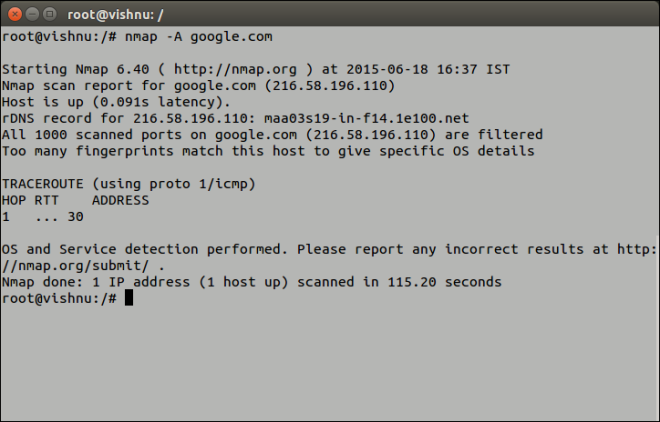
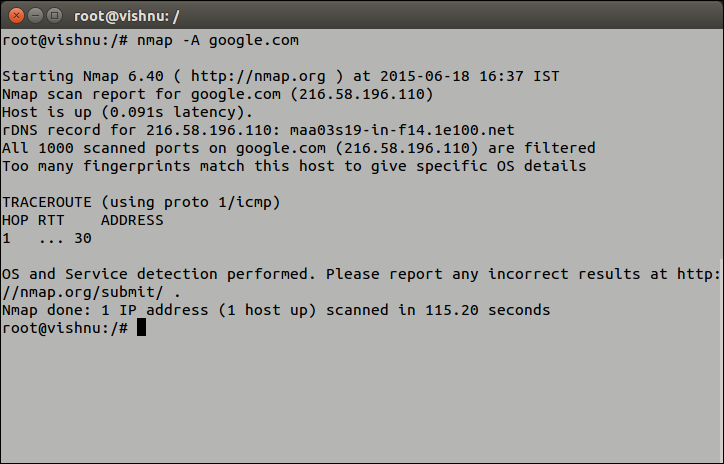
An example run of Nmap - Save and View Scan Report
Scan report can be redirected to a text file for later use. This is done using the –oN switch. The command isnmap -p --oN
Wireshark
Wireshark is an open source, free network packet analyzer. It captures packets in real time and lists them in a user friendly GUI with options to color code, filter and much more. It is a defacto GUI tool to monitor network traffic and can be considered astcpdump with GUI front end and integrated sorting and filtering options. If you find it interesting to read on its history, the wikipedia page should be helpful.
We’ll just look into a few of it’s aspects and capabilities now.
- Getting Wireshark
As mentioned earlier, it’s a free open source tool. So you can freely download and install on your system from its official download page and is available for windows, Mac OS X and Linux distributions. On Ubuntu, you can install it from the command line:
sudo apt-get install wireshark
- Run
Run Wireshark with root provileges. This is important!
gksudo wireshark
- Wireshark Window
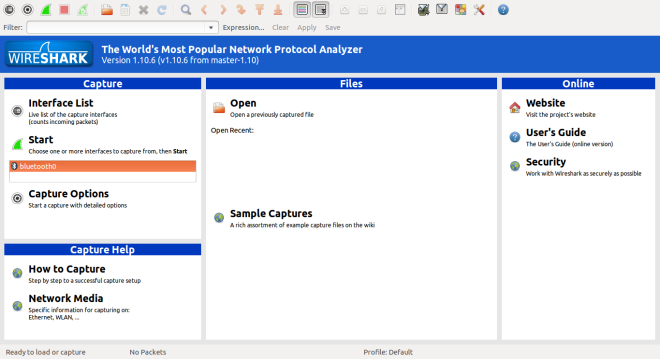
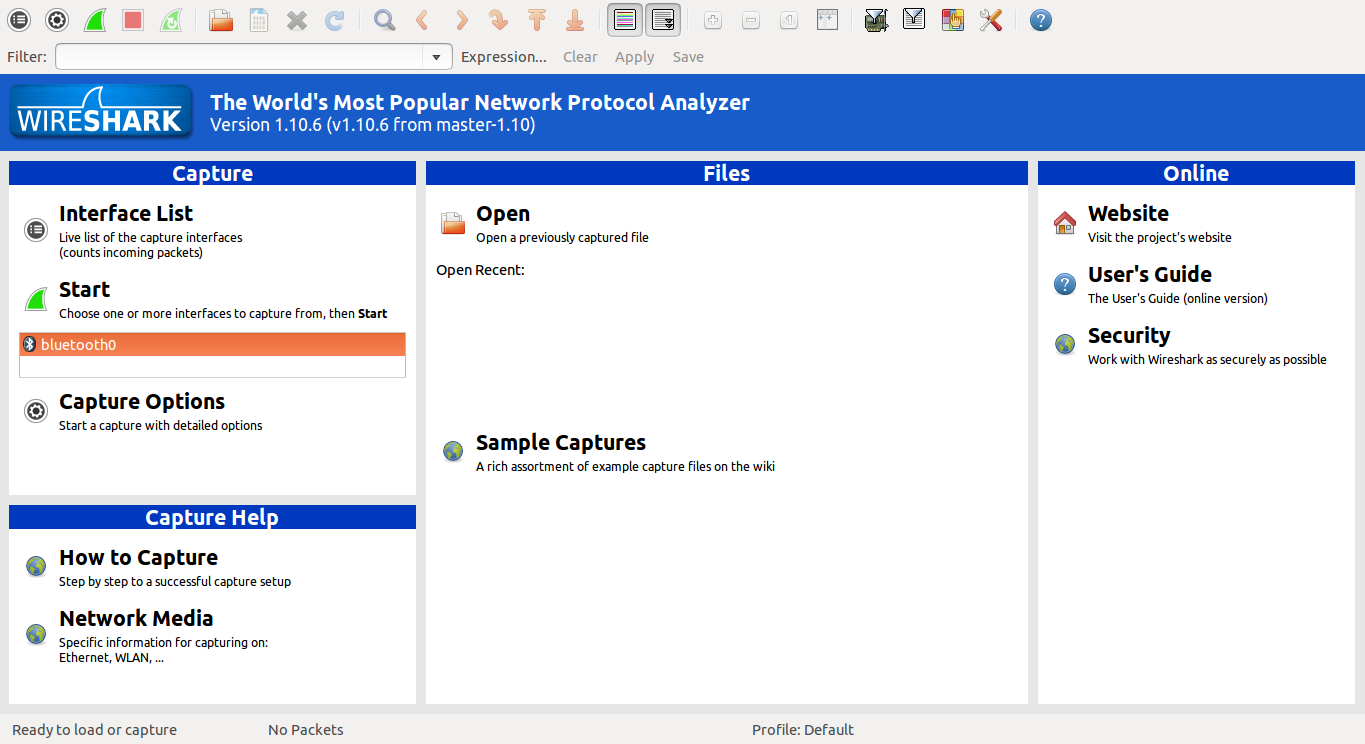
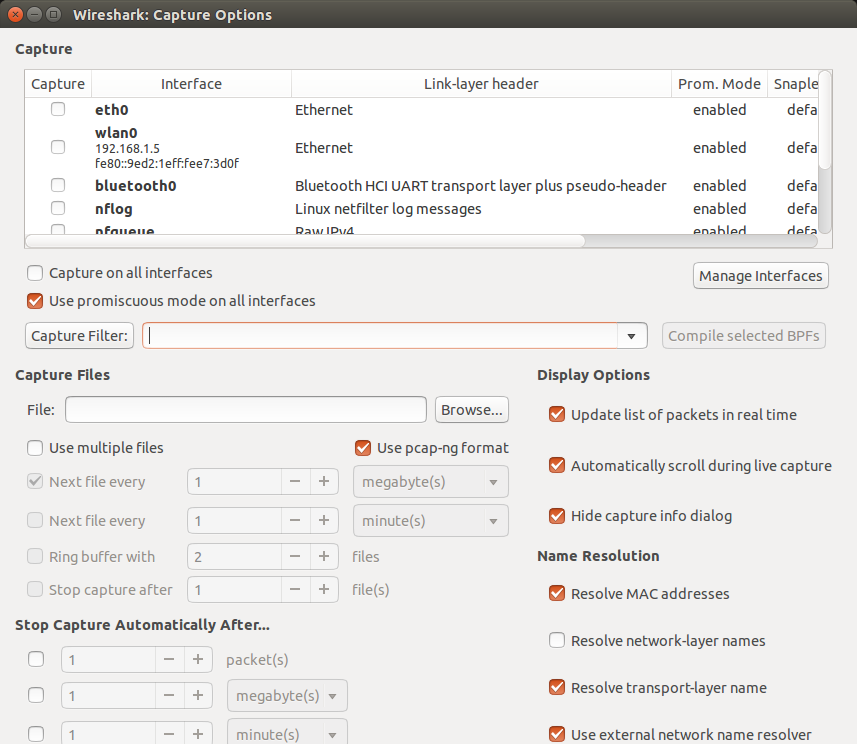
Wireshark Window Upon starting wireshark as su, the main window displays the interface list. The interface list displays the available network interfaces in the system, with options to start the capture. Capture options dialog will help you to specify various options to follow during packet capture.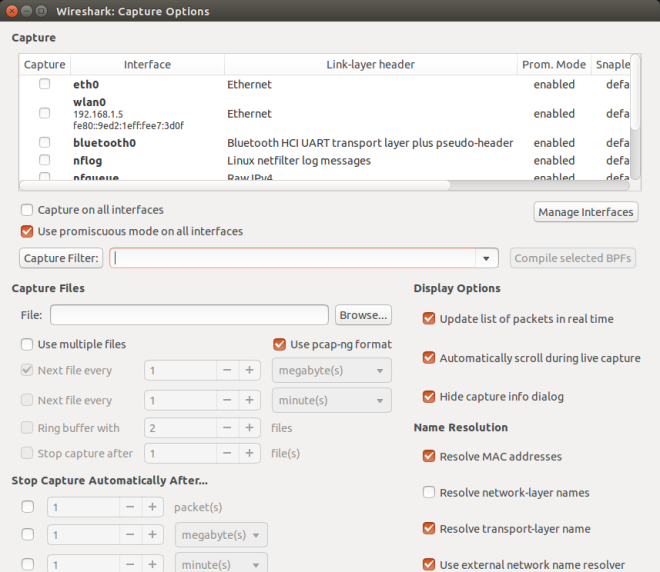
Capture Options Window - Capture Window
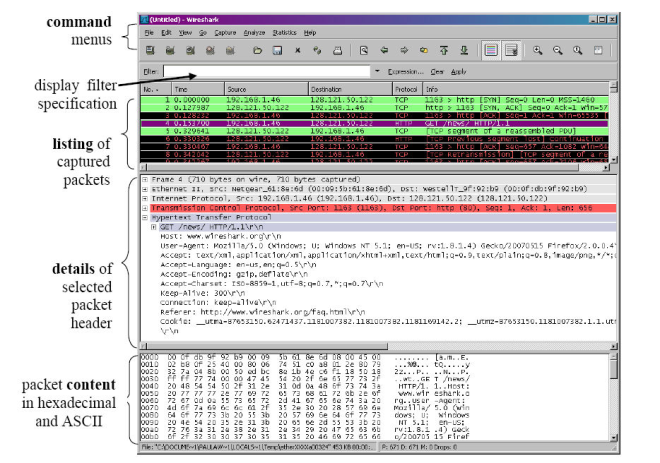
Capture Window The Capture Window as shown above displays the captured packets in real time. You can inspect each packet’s content, by choosing the appropriate packet from the packet list, in the packet details and packet bytes sections. Packets can be color coded for each protocol, filtered according to various filtering parameters and sorted on various fields. - Start Packet Capture
To start packet capture for a desired interface, you can select that interface and simply click on the start button. The Capture Window will appear showing real time captured list of packets. - Apply Filter
You can use the filtering option to filter and display captured packets according to some criteria. Appropriate filtering options can be specified into the filter box in the filter tool bar. An example criteria can be to display packets send from a particular ip(say 10.20.30.40). The suitable filtering option here will beip.src == 10.20.30.40 - Save and Load Capture Data
The captured packets can be saved as a capture file on to the disk for later use. Save the capture with a desired file name as a.pcapngfile. Wireshark also allows to save the capture file in other packet capture file formats like pcap, libpcap, Microsoft NetMon formats. - Crack passwords
Thus, with Wireshark you can inspect the network packets. This obviously means you can open it up in the packet byte section and read them. What more do you need to read a submitted form fields? Or more specifically passwords? Try creating a localhost website with a password field and capture the packets transferred during form submit. You can easily find the submitted form fields in one of the captured packets. Now that you have succeeded to steal passwords why don’t you try it out for somebody’s facebook or gmail password? To start with, steal your own facebook password. Capture the packets and inspect them. What do you see? Yeah, that’s all about https.
19 Jan 2014
Animate Page Scroll
Web developers are always eager to add dynamic effects to static web pages. The advent of jQuery simplified much of its hurdles. A common feature nowadays in modern websites is the animation of page scroll. It can be achieved with just 3 lines of jQuery code.
Here's it. The code will animate scrolling when clicked on anchors with class menu-link.
Here's it. The code will animate scrolling when clicked on anchors with class menu-link.
jQuery('a.menu-link').click(function(e){

e.preventDefault();

var href= jQuery(this).attr("href");

jQuery('html, body').animate({

scrollTop: jQuery(href).offset().top - 50}, 1000); });
Subscribe to:
Posts (Atom)